
Download Lumber Tycoon 2 – free business simulator, Roblox, lumber tycoon 2, play online, wood chopping, timber empire, buy land, expand business, make money, online multiplayer
Overview
Lumber Tycoon 2 is a free business simulator available on the Roblox platform, designed for players who enjoy managing virtual enterprises through repetitive, rewarding tasks. The game centers around the core concept of building a timber empire by chopping trees, processing wood, and selling materials for in-game currency. Players begin with minimal resources—a basic ax and a small plot of land—then gradually expand their operations by purchasing machinery, vehicles, and additional land.
The experience is structured around progression, where each upgrade increases efficiency and profitability, encouraging long-term engagement. The game emphasizes casual, laid-back gameplay with no time pressure, allowing players to build at their own pace. While the publisher has not shared detailed story information, the gameplay is driven by economic growth and competitive ambition, particularly through the server-wide leaderboard that ranks players by their bank balance.
Lumber Tycoon 2 fits within the broader genre of tycoon and simulation games, appealing to fans of games like Ice Cream Tycoon, War Tycoon, and House Tycoon. It is particularly suited for younger audiences and casual gamers who enjoy incremental progression and online multiplayer interaction.
Gameplay & Core Mechanics
The gameplay in Lumber Tycoon 2 revolves around a cycle of resource gathering, processing, and monetization. Players start by using a basic ax to chop down trees, then cut the logs into smaller pieces for transport. These raw materials are sold at a store for a modest return, but the real profit comes from processing wood into higher-value items like planks using purchased machinery.
As players earn more in-game funds, they unlock new tools and vehicles that automate or accelerate tasks, reducing manual effort. The game supports expansion through land purchases, allowing players to construct more facilities and increase production capacity. Interaction is primarily focused on managing inventory, upgrading equipment, and optimizing workflow.
The game does not feature traditional missions or story-driven objectives, instead relying on self-directed progression. Players can observe others’ developments on the server, adding a social and competitive layer. The developer did not provide additional gameplay details regarding specific mechanics, such as weather systems, random events, or multi-tiered business models.
The core loop is consistent with genre expectations: gather → process → sell → reinvest → repeat. This structure fosters long-term engagement through incremental rewards and visible growth.
- Free-to-play business simulation with in-game purchases
- Tree chopping and wood processing mechanics
- Land acquisition and expansion system
- Unlockable machinery and transport vehicles
- Server leaderboard for competitive tracking
- Online multiplayer environment
Graphics, Audio & Performance
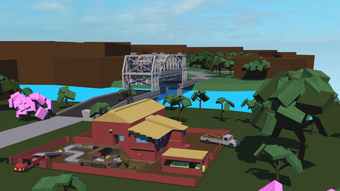
Lumber Tycoon 2 features a stylized, blocky visual aesthetic typical of Roblox games, with simple textures and basic 3D models. The environment includes forests, storage buildings, and processing units, all rendered in a consistent, low-poly style. Animations are functional rather than detailed—tree chopping, log cutting, and vehicle movement follow predictable patterns.
Visual effects are minimal, with no advanced lighting or particle systems reported. The soundtrack is ambient and repetitive, designed to support the relaxed pace of gameplay without distracting from it. Sound effects are basic, including chopping noises, machinery hums, and transaction chimes.
No official performance benchmarks were provided. Performance consistency may vary depending on the player’s device and Roblox client stability. The developer did not disclose detailed graphical settings or optimization features.
Platform-specific enhancements were not disclosed. Overall, the experience is optimized for accessibility, prioritizing smooth performance over visual fidelity. The game is designed to run on a wide range of devices, though exact technical requirements were not listed.
Platform Compatibility & Requirements
Lumber Tycoon 2 is available exclusively on the Roblox platform, accessible via desktop, mobile, and tablet devices through the Roblox application. The game is free to play, with in-game purchases available for optional enhancements. No minimum system requirements were listed by the developer.
Compatibility details were not fully provided, but the game is designed to run on standard hardware capable of supporting the Roblox platform. The release version was launched on September 1, 2023. Players can access the game through the Roblox website or app without the need for additional downloads or installations.
The game is designed to function within the Roblox ecosystem, relying on its built-in networking and server infrastructure. No standalone version or external dependencies were mentioned.
Pros and Cons
Pros
- Free to play with no pay-to-win elements
- Simple, intuitive mechanics suitable for all ages
- Gradual progression with visible rewards
- Online multiplayer with competitive leaderboard
- Expansive building and customization potential
- Low system requirements due to Roblox integration
Cons
- Visuals and animations are basic and repetitive
- Limited depth in gameplay beyond core loop
- No official information on long-term updates or content plans
- Dependent on Roblox’s infrastructure and server stability
- Monotonous tasks may not appeal to all players
- No offline mode available
Is the game safe to download?
Yes, Lumber Tycoon 2 is hosted on the official Roblox platform, which implements security measures to protect users. As long as you access the game through the official Roblox website or app, it is safe to play.
Is it beginner-friendly?
Yes, the game is designed with a simple learning curve. Players start with basic tools and gradually unlock more complex systems, making it accessible for new users and younger audiences.
Does it receive updates?
The developer has not provided information on update frequency or content plans. However, Roblox games typically receive periodic maintenance and balance adjustments.
What platforms support it?
Lumber Tycoon 2 is available on all devices that support the Roblox platform, including Windows, macOS, iOS, Android, and tablets.
Does the game require an internet connection?
Yes, the game requires a stable internet connection to access the Roblox server and participate in online multiplayer gameplay.
Final Thoughts
Lumber Tycoon 2 delivers a straightforward yet engaging business simulation experience tailored for casual players and Roblox enthusiasts. Its core loop of chopping, processing, and selling wood is satisfyingly incremental, offering steady rewards that encourage continued play. The ability to expand land, unlock machinery, and climb the server leaderboard adds depth and long-term motivation. While the graphics and audio are minimal, they align with the platform’s design standards and do not hinder gameplay. The game’s free-to-play model, combined with its accessible mechanics and online multiplayer nature, makes it a strong entry in the tycoon genre. It appeals to fans of idle progression, virtual entrepreneurship, and light competition. For those who enjoy building empires from the ground up in a relaxed, social environment, Lumber Tycoon 2 offers a solid, repeatable experience. Download Lumber Tycoon 2 now







